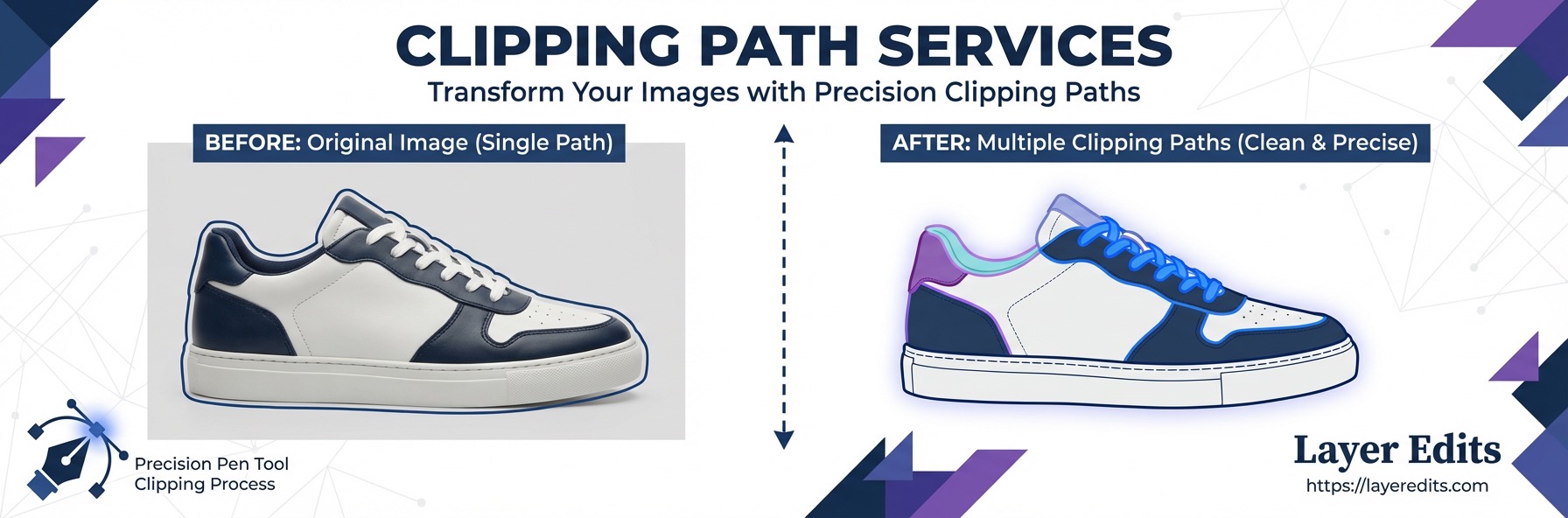
Quick Comparison
Clipping Path
Single outline — isolates the whole product
Multiple Clipping Path
Multiple outlines — isolates individual parts
Starting Price
$0.19/image
Multi-path from $0.49
Delivery
24 Hours
6-hour rush available
Approval Rate
99.5% first-time approval
Best For
Color variants, selective editing
What Is a Clipping Path?
A clipping path is a single vector outline drawn around your entire product using Photoshop's Pen Tool. Everything inside the path stays. Everything outside gets removed. It's the most common technique for isolating products from their backgrounds.
The path is made of anchor points and curves that follow the outer edge of your subject. Once the path is closed, it acts like a cookie cutter — clean, precise, and scalable without quality loss. This makes it ideal for products with well-defined, hard edges.
Best subjects for a single clipping path: shoes, bottles, electronics, boxes, watches, books, and any product with smooth, predictable edges. If you can trace the outline with a pen without losing important detail, a single path is all you need.
Most ecommerce platforms require product images on a pure white background. A basic clipping path handles this efficiently — our editors complete a simple product path in 2-5 minutes. For more complex shapes with curves and holes, it takes 5-15 minutes. Check our complete clipping path guide for a deeper look at how the technique works.
What Is a Multiple Clipping Path?
A multiple clipping path (also called multi-path or compound path) creates several separate outlines within the same image — each isolating a different part of the product. Instead of treating your subject as one piece, it breaks it into individually editable sections.
Think of a shirt. A single clipping path draws one outline around the entire shirt. A multiple clipping path draws separate paths around the fabric body, collar, sleeves, buttons, and stitching. Each path becomes its own selection — and each can be edited independently without affecting the rest.
This is how professional editors create color variants from a single photograph. By isolating the fabric area with its own path, they can swap the color from red to blue, black, or any other option without re-shooting the product. One photo becomes an entire catalog.
If your client says "I need color options" or "show me this shirt in blue" — that's a multiple clipping path job. Any request involving selective color changes, part-by-part retouching, or material-specific adjustments requires multi-path work.
Key Differences: Side-by-Side Comparison
The core difference is simple: a single clipping path isolates the whole object, while a multiple clipping path isolates individual parts within that object. Everything else — cost, time, complexity — follows from that distinction.
| Feature | Single Clipping Path | Multiple Clipping Path |
|---|---|---|
| Purpose | Isolate the entire object | Isolate individual parts separately |
| Best For | Background removal, simple cutouts | Color variants, selective editing |
| Complexity | Low to Medium | Medium to High |
| Time Per Image | 2-15 minutes | 15-45 minutes |
| Starting Price | $0.19/image | $0.49/image |
| Output | Single cutout (PNG/PSD) | Multiple editable layers (PSD) |
| Common Industries | E-commerce, catalogs, marketplaces | Fashion, furniture, multi-color products |
The price difference reflects the work involved. A basic clipping path requires one continuous outline. A multi-path job may require 5-15 separate paths on the same image, each precisely drawn to separate materials, textures, or color zones.
When to Use Each Technique
The decision comes down to one question: do you need to edit the product as a whole, or do you need to edit specific parts independently?
Use a Single Clipping Path When:
- You need a clean background removal — white, transparent, or custom color
- Your product has simple, well-defined edges (shoes, bottles, electronics)
- You're preparing images for Amazon, Shopify, or other marketplace listings
- You're processing high-volume batches of similar products
- No internal color or part-specific edits are needed
Use Multiple Clipping Paths When:
- You need color variants from a single product photo
- Different parts of the product need separate color correction or retouching
- You're creating a product catalog showing the same item in multiple colors
- The product has distinct material zones (fabric, metal, leather) needing different treatment
- Your designer needs an editable PSD with individually selectable product parts
Real Client Example
A fashion brand sent us a single high-quality photo of their bestselling t-shirt in red. They needed it shown in 8 colors for their online store: red, blue, black, white, green, navy, grey, and pink. Using multiple clipping paths, we isolated the fabric body, collar, sleeves, and stitching as separate selections. Each color variant was created in under 10 minutes — the brand got 8 catalog-ready images from 1 photoshoot instead of 8 separate shoots.
Can You Combine Both Techniques?
Yes — and for many professional projects, combining both is the standard workflow. You start with a single clipping path to remove the background cleanly, then apply multiple clipping paths to the internal areas for selective editing.
Here's how our editors handle a typical combined job: first, a basic path isolates the product from the background. Then, separate paths are drawn around each component — the shoe's leather body, rubber sole, laces, and metal eyelets. The background gets replaced with white, the leather gets a subtle warmth boost, and the sole color is adjusted to match the brand's specification. All from one source image.
This combined approach is especially common for furniture, fashion accessories, and electronics where different materials need different color treatment. At Layer Edits, our editors assess every image and apply the right combination automatically — you don't need to specify which technique to use.
Request PSD format delivery when ordering multi-path work. The paths stay as separate layers in your Photoshop file — your in-house designer can create new color variants later without starting from scratch. It's the difference between a one-time edit and a reusable asset.
Pricing & Turnaround
Single clipping paths start at $0.19 per image. Multiple clipping paths start at $0.49 per image. The price difference reflects the additional precision and time required to draw separate paths for each product component.
| Service | Starting Price | Standard Delivery | Rush Delivery |
|---|---|---|---|
| Clipping Path | $0.19/image | 24 hours | 12h (+50%) or 6h (+100%) |
| Multiple Clipping Path | $0.49/image | 24 hours | 12h (+50%) or 6h (+100%) |
| Color Correction | $0.29/image | 24 hours | 12h (+50%) or 6h (+100%) |
| Color Change | $0.49/image | 24 hours | 12h (+50%) or 6h (+100%) |
| Image Masking | $0.69/image | 24 hours | 12h (+50%) or 6h (+100%) |
Volume Discounts
- 100-500 images: 10-15% off
- 500-1,000 images: 15-20% off
- 1,000+ images: 20-25% off
Visit our pricing page for complete details, or request a free quote for your specific project. Volume discounts apply to both single and multiple clipping path orders.
Layer Edits Pricing
We offer clipping path services starting at $0.19 per image and multiple clipping path from $0.49 per image. 24-hour standard delivery, 6-hour rush available. Every image is hand-edited by our team of 75+ Photoshop experts. Get a free quote for your project.
Conclusion
Choosing between a single clipping path and multiple clipping paths depends entirely on what you need to do with your product images after the edit. Here are the key takeaways:
- Single clipping path is faster, cheaper, and perfect for background removal on simple products — starting at $0.19/image
- Multiple clipping path gives you control over individual product parts — essential for color variants, selective editing, and catalog creation from $0.49/image
- Both techniques can be combined on the same image for maximum flexibility
- Request PSD delivery for multi-path work to keep paths editable for future use
- Our 75+ editors deliver both services with 24-hour turnaround and a 99.5% first-time approval rate
Not sure which technique your images need? Try 2 images free — our team will assess your photos and recommend the right approach. Or request a free quote to get pricing for your full batch.
Frequently Asked Questions