Multiple Clipping Path Service
Create unlimited color variants from one photo. Our multi-path editors isolate each element – collar, buttons, fabric, logo – for independent editing. Hand-drawn paths by Photoshop experts. No AI. From $0.49/image with free trial.
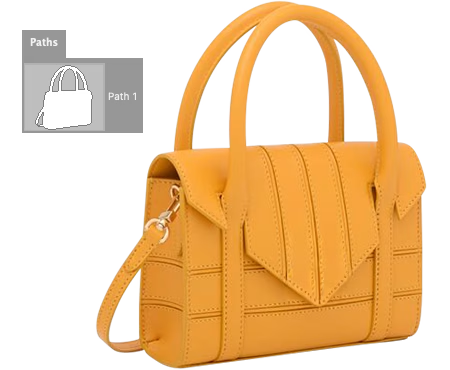
Creating color variants costs you time and money
Photographing the same product in 10 colors means 10 separate photo shoots. That's more studio time, bigger budget, extra logistics you don't need.
Fashion brands and ecommerce stores need to show products in every color. Regular clipping path only removes backgrounds – it can't help you edit individual parts separately. You're stuck photographing each variant from scratch.
Multiple clipping path creates separate vector paths for collar, buttons, fabric, and logo. Then you change colors digitally without expensive reshoots. One photo session, unlimited color variants. Save 80% on photography costs.
What If You Could...
Isolate Parts for Independent Color Editing
Multiple clipping path creates separate vector outlines around different parts of one product image. Unlike basic clipping that separates the whole product from background, multi-path isolates each element – collar, buttons, body, logo – so you can edit or recolor them independently. Essential for creating color variants without reshooting.
One photo shoot, unlimited color options. This technique saves fashion brands and ecommerce stores thousands in photography costs.
Single Path vs Multiple Path
When do you need multi-path instead of basic clipping?
| Feature | Single Path | Multiple Path |
|---|---|---|
| Paths Per Image | One path around product | 2-25+ paths per image |
| Editing Capability | Background removal only | Edit each part separately |
| Color Variants | Requires reshoot per color | Create unlimited digitally |
| Output Format | Flat PNG or JPG file | Layered PSD with named layers |
| Best For | Simple background swaps | Fashion, jewelry, variants |
| Cost Savings | None - still need reshoots | Save 80% photography costs |
| Starting Price | From $0.19/image | From $0.49/image |
Pro tip: Multi-path pays for itself after 2-3 color variants. One photo shoot → unlimited color options.
Single Path vs Multi-Path Results
The difference between basic clipping and multi-path editing capabilities.
Single Clipping Path
- One path around entire product
- Background removal only
- Cannot edit parts separately
- Requires reshoot for each color
- Single flat file output (PNG/JPG)
Multiple Clipping Path
- 2-25+ paths isolating each element
- Edit collar, buttons, body separately
- Create unlimited color variants
- Save 80% on photography costs
- Layered PSD with organized named layers
Let Experts Handle Your Multi-Path Work
Precision path work giving you complete control over every product element.
Outsource your multi-path work starting at $0.49 per image. Get layered PSDs with organized, named layers delivered within 24 hours.
Every path is hand-drawn by trained Photoshop experts using pen tablets. We isolate collar, buttons, body, logo – whatever elements you need for independent editing.
Why Outsource to Layer Edits?
How Multi-Path Service Works
From upload to delivery in 4 simple steps
Upload Your Images
Send product photos via our portal, Dropbox, or Google Drive. Any format works – JPG, PNG, PSD, TIFF.
Tell Us What to Path
Specify which parts need separate paths – collar, buttons, body, trim, logo. We'll quote within 1 hour.
We Draw the Paths
Our Photoshop experts hand-draw paths around each element. No AI, no automation – just skilled hands.
Download Your PSDs
Get layered PSD files with named layers ready for color editing. Request free revisions if needed.
4 Levels of Path Complexity
Pricing based on the number of paths needed – from simple to super complex
Simple (2-3 Paths)
Basic multi-path for products with 2-3 distinct color areas. Perfect for solid-color t-shirts, simple accessories, or items with minimal components needing separate editing.
- 2-3 separate paths
- Basic products
- From $0.49/image
- 24 hour delivery
Standard (4-6 Paths)
Most popular tier for apparel with collar, body, sleeves, and trim. Ideal for polo shirts, dresses, jackets, and multi-component products needing individual part editing.
- 4-6 separate paths
- Most popular option
- From $0.49/image
- Polo, dress, jacket
Complex (7-15 Paths)
For detailed products with many components – buttons, zippers, pockets, logos, trim. Perfect for detailed jackets, shoes, handbags, and accessories with intricate parts.
- 7-15 separate paths
- Detailed products
- From $1.99/image
- Shoes, bags, jackets
Super Complex (16+ Paths)
Maximum detail for jewelry, watches, and intricate products. Every stone, prong, and metal component isolated for complete editing control over each element.
- 16-25+ separate paths
- Jewelry specialists
- From $3.99/image
- Rings, watches, chains
Not sure how many paths your products need? Send us samples for a free assessment!
Get Free QuoteIndustries Using Multiple Clipping Path
Essential for businesses selling products in multiple colors or variations
Fashion & Apparel
Create seasonal colorways from a single photo shoot. Perfect for clothing brands showing items in multiple colors without expensive reshoots.
Jewelry Retailers
Isolate stones, metals, and settings for independent editing. Show rings and necklaces in gold, silver, and different gem colors.
Ecommerce Stores
Expand your catalog without expanding your photography budget. Create all color variants digitally from master product photos.
Product Photographers
Offer multi-path as a premium service to clients. Deliver layered PSDs for maximum flexibility and charge premium rates.
Catalog Production
Build print and digital catalogs faster. Create product variations digitally instead of scheduling multiple photo sessions.
Marketing Agencies
Create campaign variations quickly. Test different color options and seasonal themes without additional photography costs.
Frequently Asked Questions
Everything about our multiple clipping path service
When you upload images, simply list the parts you need isolated in the order notes.
Example: "collar, body, buttons, logo" or "sleeves, torso, trim".
You can also mark up a sample image showing the areas. We'll quote based on path count and complexity.
Each path gets a clearly labeled layer name like "Collar_Path", "Body_Path", "Button_1_Path".
We organize layers in folders by component type. You can request custom naming conventions for your workflow - just let us know your preferred structure.
We deliver: Layered PSD files with all paths saved as vector paths and separate layers.
Each element can be selected, recolored, or edited independently. We can also provide TIFF with layers or individual PNG cutouts of each component if needed.
Standard delivery: 24 hours for most orders
Simple paths (2-3 per image): 24 hours
Complex jewelry (15+ paths): 48-72 hours
Rush delivery is available in 12 hours (+50%) or 6 hours (+100%) — we'll confirm timeline when quoting.
Yes. Volume discounts available:
- 100-499 images: 10% off
- 500-999 images: 15% off
- 1,000+ images: up to 25% off
For ongoing clients needing monthly multi-path work, we offer custom enterprise rates.
We can do both. If you want, we'll create the multi-paths AND apply specific color changes you request.
Just provide color codes (HEX, Pantone, or RGB) for each variant. This is billed separately from path creation - typically $0.10-$0.25 per color variant.
Learn More About Multi-Path Editing
Multiple clipping path is a specialized technique. These guides explain when you need it and how it compares to standard paths.
- 📖 Clipping path vs multiple clipping path — when you need multi-path vs single
- 📖 What is clipping path? — the foundation of multi-path work
- 📖 What is layer editing? — how PSD layers work with multi-paths
- 📖 How to create clipping path in Photoshop — DIY tutorial for the technique
Try Multi-Path Free – From $0.49/Image
Send us 2 product images. We'll create multi-paths free – no credit card required. Stop reshooting, start creating color variants digitally.
*Conditions apply — see Terms