Image Masking Service
Hair, fur and glass need more than a background eraser. Our Photoshop editors mask every strand by hand on a pen tablet. Before your files go out, we check the edges at 300%. Image masking starts at $0.69 per image, delivered in 6-24 hours. Send two images free and judge the edges yourself.
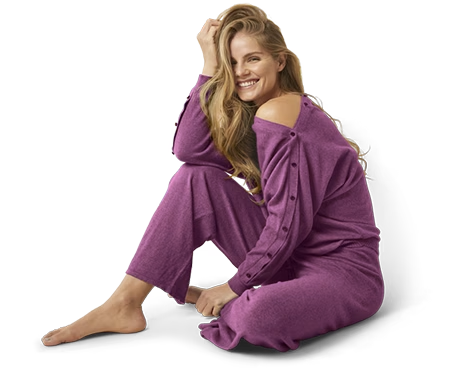
Spending Hours on Hair Masking? There's a Better Way
Complex backgrounds with hair and fur are eating your entire day. AI tools destroy every soft edge. Manual masking takes forever.
You've got product shots with flowing hair, pet photos with fluffy fur, and fashion images with lace details. Each one needs careful masking. But AI background removers chop hair into pixelated mess. And you're too busy to spend 30 minutes per image doing it yourself.
Your clients want clean cutouts. Your deadlines are tight. You need a professional photo masking service that handles complex edges while you focus on what you do best - shooting and growing your business.
What If You Could...
What is Image Masking?
Image masking is a Photoshop technique that separates subjects with soft or fuzzy edges from backgrounds. Unlike clipping paths that draw hard vector lines, masking uses grayscale layer masks and alpha channels to preserve fine details like hair strands, fur, smoke, and transparent materials.
Here's how it works: white areas stay visible, black areas hide, gray creates partial transparency. This non-destructive approach lets you place masked subjects on any background naturally. Essential for portraits, pet photography, fashion with lace or mesh, and any product with complex edges AI tools destroy.
When to Use Clipping Path vs Image Masking
Not sure which technique your images need? Here's a quick comparison to help you decide.
| Feature | Clipping Path | Image Masking |
|---|---|---|
| Edge Type | Hard, defined edges | Soft, fuzzy, transparent edges |
| Best For | Products, boxes, electronics | Hair, fur, glass, fabric |
| Technique | Vector pen tool path | Layer masks, alpha channels |
| Output | Clean cutout, no transparency | Preserves partial transparency |
| Speed | Faster for simple objects | Required for complex subjects |
| Our Price | From $0.19/image | From $0.69/image |
| When to Use | Clear outline around subject | Edges are fuzzy or see-through |
Pro tip: Many images need both - clipping path for the body, masking for the hair. We recommend the best approach free.
Why AI Tools Fail at Hair and Fur Masking
AI background removal works for simple products. But complex edges like hair, fur, and transparent objects need professional photo masking by hand.
AI Background Removal
- Hair strands become blurry, pixelated mess
- Fur edges get jagged and unnatural
- Glass reflections completely vanish
- Flyaway hairs deleted or left floating
- Results scream "cheap AI background removal"
Our Image Masking Service
- Every hair strand preserved with refine edge
- Natural soft edges on all fur and fabric
- Glass and reflections stay intact
- Wispy flyaways handled with pen tablet care
- Edges blend naturally on any background
Why Photographers Outsource Image Masking to Us
Your time is worth more than $0.69 per image. Let trained Photoshop pros handle the tedious masking.
You didn't start your business to spend nights fighting layer masks and channels. Every hour on repetitive masking is an hour not spent on clients, marketing, or life outside work. Complex hair masking alone takes 20-40 minutes per image.
When you outsource photo masking to us, 75+ trained editors process your images. Hair masking, fur masking, alpha channel work - we specialize in what AI tools struggle with. It's faster and cheaper than keeping it in-house: $0.69 an image against the 20-40 minutes each one costs you. Comparing image masking service providers? The first image isn't the question. It's whether the edge still holds on the 500th. That's why the trial is two images of your choosing, not ours.
Why Outsource to Us
How It Works
From "I need help" to "wow, these look amazing" - in 4 easy steps
Upload Your Photos
Send images via our portal, Dropbox, Google Drive, or WeTransfer. Any format works - JPG, PNG, TIFF, PSD.
Tell Us Your Needs
White background? Transparent PNG? Specific edge handling? Let us know. We ask if anything's unclear.
We Mask by Hand
Our Photoshop experts hand-edit each image with pen tablets. No AI, no automation - just skilled hands.
Download & Review
Get your masked images with perfect edges. Not happy? Request free revisions until you love the results.
8 Types of Photo Masking Services
Different images need different Photoshop masking techniques. We select the right approach for your specific photos.
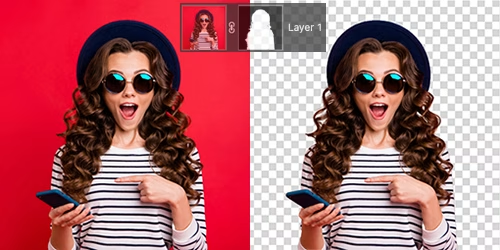
Layer Masking Service
The foundation of professional photo masking. Layer masks use grayscale values - white reveals, black hides, gray creates transparency. Non-destructive editing lets you adjust anytime.
- Basic background removal
- Soft edge refinement
- Clean edge products
- Composite image creation
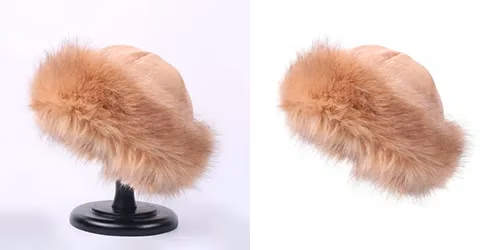
Hair & Fur Masking Service
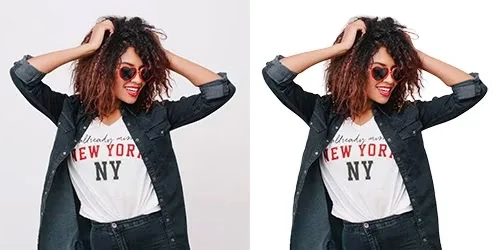
Our specialty. Hair masking preserves every flyaway strand using refine edge tools. Same precision for fur - Persian cats or windblown German Shepherds. Backlit hair on a busy background? Refine edge alone won't hold it. We pull a channel selection from the strongest channel, paint the gaps by hand, then decontaminate the colors. No rim of the old background survives. A hard portrait takes 20-40 minutes.
- Model and portrait photos
- Pet photography editing
- Fur-trimmed fashion
- Windblown hair shots
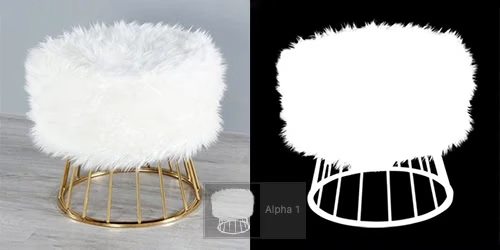
Alpha Channel Masking
Alpha channel masking stores transparency as a separate grayscale channel. Benefits: smaller files, reusable selections for batch processing, precise control. Essential for print production.
- High-contrast subjects
- Batch processing masks
- Varying brightness
- Print-ready files
Transparent Object Masking
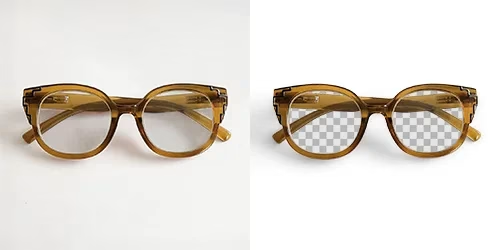
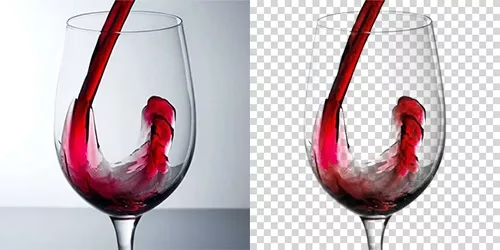
Glass bottles, wine glasses, clear containers, water splashes - we keep the see-through quality, reflections, and highlights while the background goes. Transparent products get two masks, not one. A shape mask holds the outline. A luminosity mask carries what shows through, so the label stays solid and the glass stays glass. Jewelry with faceted stones works the same way - sparkle in, background out.
- Glass bottles & jars
- Wine glasses & drinkware
- Eyeglasses & sunglasses
- Clear plastic packaging
Translucent Object Masking
Semi-transparent materials need special care - sheer fabrics, frosted glass, veils, chiffon, tulle, smoke effects. We capture that in-between quality where light passes through partially.
- Wedding veils & tulle
- Sheer fabrics & chiffon
- Frosted glass products
- Smoke and mesh effects
Color Masking Service
Isolate areas based on color values. Perfect for creating product color variants from a single photo - red dress to blue, green, any color without reshooting. Saves time and studio costs.
- Product color variants
- Selective color changes
- Color correction areas
- Print color separation
Refine Edge Masking
Also called soft edge masking. Photoshop's advanced edge detection smooths jagged edges, removes color spill, and keeps transitions natural. It's the step where a cutout stops looking cut out. We widen the radius only where the edge is soft, so the crisp parts of your product image stay crisp.
- Edge cleanup & smoothing
- Color decontamination
- Fine-tuning soft edges
- Natural transitions
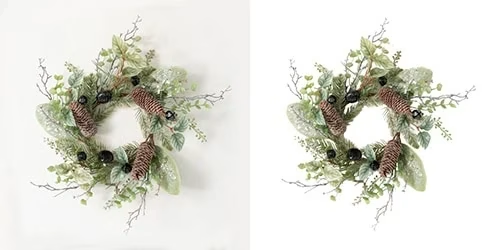
Collage Masking
Combine multiple photos into one composite. We match the edges, the light direction, and the shadow density. Your parts look photographed together, not pasted - for ad campaigns, creative projects, and any product image that has to carry several elements.
- Multi-photo composites
- Creative ad imagery
- Photo manipulation
- Fantasy & concept art
Not sure which masking type you need? Send your images - we'll recommend the best technique free.
Get Free RecommendationIndustries Using Image Masking Service
From e-commerce to fashion photography - if your products have complex edges, we handle them.
E-commerce & Online Stores
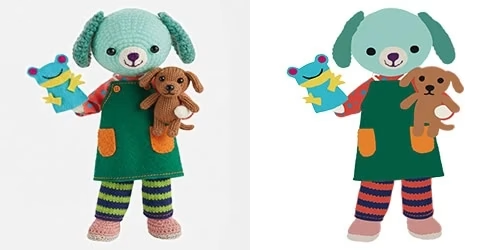
Image masking for Amazon, Shopify, and eBay sellers. Clean product cutouts with natural edges sell better. We handle fuzzy products like plush toys and textured goods. You get every image at the size and background your marketplace asks for.
Fashion & Apparel
Lace collars, fur-trimmed coats, feather accessories, mesh fabrics. Fashion product photography needs professional masking for catalog-ready images.
Beauty & Cosmetics
Glass perfume bottles, transparent serums, powder particles. Transparent object masking keeps the premium, glossy look your beauty products deserve.
Portrait Photographers
Hair masking saves hours. You shoot - we handle complex masking. Swap backgrounds, create composites, deliver clean cutouts to your clients fast.
Home & Garden
Plants with leaves, wicker furniture, textured throws, decorative items. Natural products need natural-looking soft edges only masking delivers.
Ad Agencies & Studios
Big campaigns need perfect composites fast. Your creative team focuses on concepts while we handle technical masking. Bulk orders welcome.
Common Questions About Image Masking
Quick answers to what our clients ask most
Image masking is a Photoshop technique that removes backgrounds from photos with soft or fuzzy edges.
It uses layer masks and alpha channels to create grayscale selections - white reveals, black hides, gray creates partial transparency. This preserves fine details like hair strands, fur texture, and glass reflections.
Clipping path: Uses a hard vector line for objects with clean, defined edges - electronics, boxes, furniture.
Image masking: Uses grayscale values for soft edges - hair, fur, smoke, transparent glass.
Rule of thumb: If you can trace a clean line around it, use clipping path ($0.19). If edges are fuzzy or see-through, use image masking ($0.69).
Our image masking service starts at $0.69 per image.
Pricing varies based on the complexity of edges and the masking technique required. Volume discounts: 100-499 images get 10% off, 500-999 get 15% off, 1,000+ get up to 25% off.
Standard delivery: 24 hours for most orders
Rush delivery: 12 hours (+50% surcharge) or 6 hours (+100% surcharge)
Bulk orders (500+ images): may extend to 24-48 hours
We accept: JPG, PNG, TIFF, PSD, RAW, and most image formats.
We deliver: PNG with transparent background (most common), PSD with editable layers, TIFF for print, or JPG on white/custom background.
No. AI background removal fails on complex edges.
Hair strands get chopped or blurred, fur becomes pixelated, glass reflections disappear.
Professional hair masking and fur masking require hand-editing with pen tablets and Photoshop's refine edge tools. We guarantee natural-looking results.
Yes. Send two images free, no card needed. Pick your hardest shots - backlit hair, fur on a dark background, a glass bottle with a label. Easy images prove nothing.
You'll get them back the way a paid order arrives: PNG with transparency, or PSD with the mask still live so your own editor can check our work.
Transparent products need two masks, not one. A shape mask holds the outline. A luminosity mask carries what you see through, so the label and cap stay solid while the glass keeps its transparency.
For jewelry we keep the reflections and the sparkle inside the stones, and only the background behind them goes. Tell us where the piece will sit - white, a color, or a reflective surface - because that changes how much of the original highlight we keep.
We'll keep working until you're happy. Revisions are free, and a fix that falls inside your original brief never costs extra.
The fine print, so nothing surprises you: ask within 5 days (120 hours) of delivery, up to 5 rounds per order, and put every change for one image into the same request. Work beyond your original instructions - a new background, a different crop, extra retouching - is a new job, and we'll quote it before we start.
Usually, yes. Masking is one step in a bigger job: a clipping path or background removal for the simple parts, masking for the hair and glass, then shadow creation or color correction before your files go live.
Order it as an editing service on its own, or send a mixed batch. We'll apply the right technique per image and bill each at its own rate. You don't have to sort the batch yourself.
No. We don't publish client work, name clients, or use your photos as samples.
Files are deleted from our servers 30 days after delivery unless you ask us to keep them. Need an NDA first? We'll sign yours before the first upload.
Learn More About Image Masking
Masking vs clipping path is a common question. Read these before ordering to make sure you request the right service for your photos.
- 📖 Clipping path vs image masking — when each technique wins
- 📖 Image masking techniques for complex products — hair, fur, glass, and translucent edges
- 📖 What is clipping path? — the simpler counterpart to masking
- 📖 What is background removal? — overall process including masking
Try 2 Images Free - No Card Required
Send us your toughest photos - complex hair, fluffy fur, tricky glass. We'll mask them free so you see our quality. Love it? Image masking starts at $0.69. Bulk orders of 100-499 images get 10% off, 500-999 get 15% off, and 1,000+ get up to 25% off.
*Conditions apply — see Terms